The Halo Array: A Concept for a Highly Isolated Computer System
This was an idea I had one afternoon while thinking about how I would design a computer system capable of handling increasingly complex cyberattacks. The basic idea is to build the computer environment in layers, with each layer providing another opportunity to isolate, observe, or stop an attack before it can move further through the system.
I started thinking about attacks as a rough progression:
Phishing → Password Attack → Malware → Vulnerability Exploitation → Multi-Stage Intrusion → Custom/Zero-Day Exploitation → Large-Scale Coordinated Campaign
The question I asked myself was:
What would a computer system look like if isolation was designed into the hardware and workflow from the beginning, rather than being primarily a software feature?
My proposed answer is what I call the Halo Array.
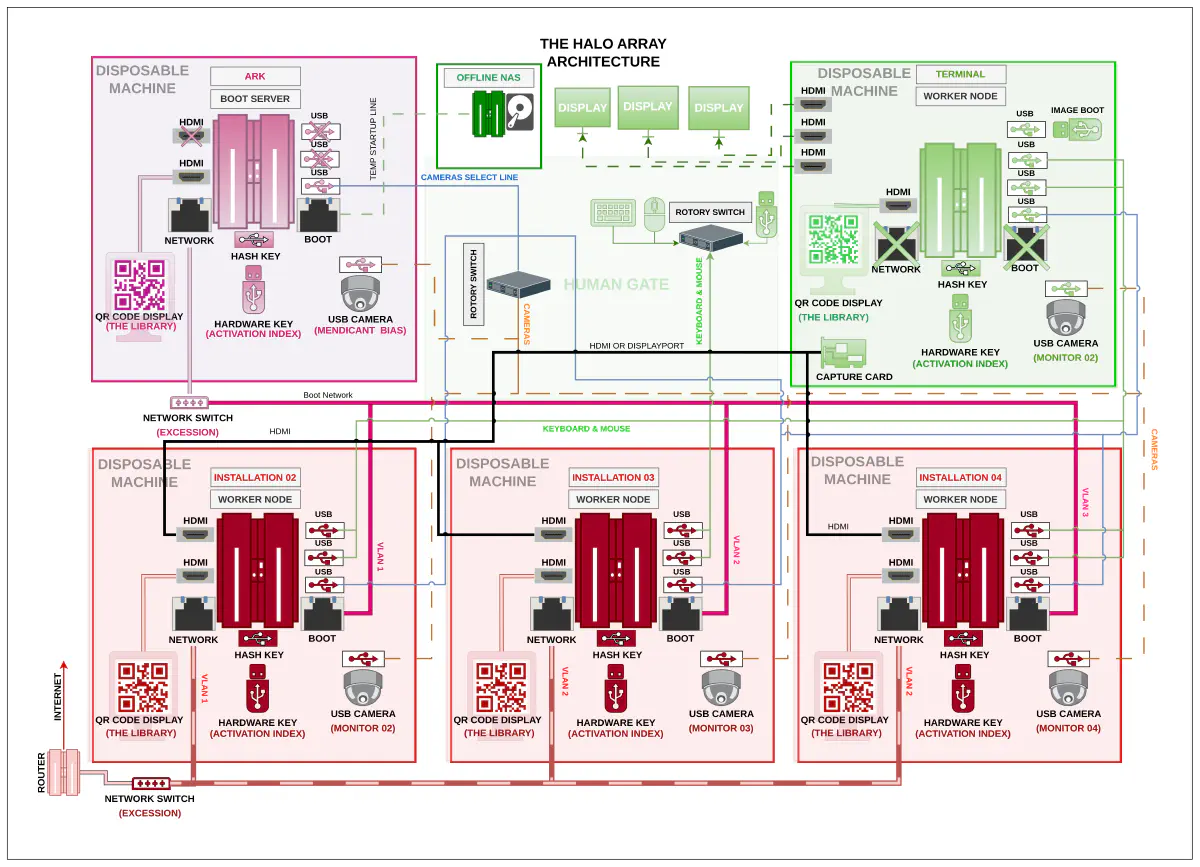
The Halo Array is built around three main systems:
- The Ark — the boot and provisioning server.
- The Installations — the computers on which the user actually works.
- The Terminal — the isolated interface that brings the systems together for the user.
The goal isn’t to create an impenetrable computer. Instead, the goal is to make communication between systems deliberate, constrained, observable, and difficult for software to perform without the user’s involvement.
The Ark — Boot Server

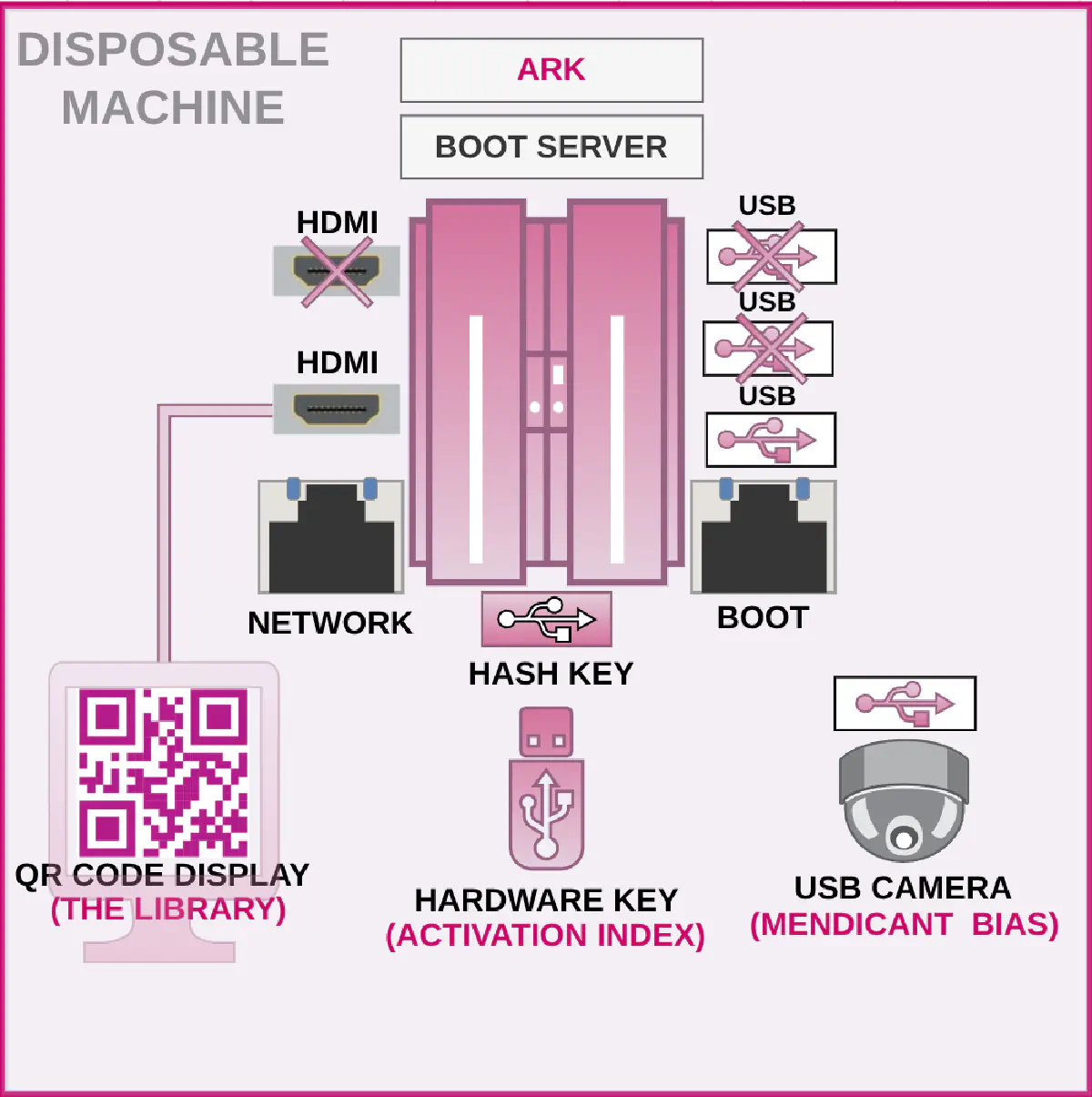
The Ark is the disposable boot and provisioning server for the system. Its primary responsibility is to provide operating-system images to the other machines, which I call Installations.
The basic workflow would look something like this:
- The main server prepares or retrieves the required operating-system images.
- The images are loaded onto the Ark.
- The connection to the offline storage system is disconnected.
- The Ark is then connected to the boot network.
- Installations can boot from the Ark.
- Once the environment is no longer required, the images or entire boot environment can be discarded and replaced.
The important part of this design is that the Ark should never simultaneously have access to both the offline storage environment and the operational boot network. Ideally, this would be enforced physically rather than simply through software configuration. The Ark would therefore have two network connections, but they would serve completely different purposes.
Offline connection
The first connection is to an offline NAS or other storage system. This provides the operating-system images and other data required to provision the Installations. Once the required data has been transferred, this connection is physically disconnected.
Boot network
The second connection connects the Ark to the switch used by the Installations. This network exists specifically to provide PXE/network boot services. Unlike the Installations, the Ark doesn’t need a keyboard, mouse, or conventional display. Instead, it would have a small camera and QR-code display that allow it to communicate with the Terminal through the system’s optical communication mechanism.
For example, the Terminal could request that the Ark deploy a particular environment, such as:
- A web-browsing environment
- A development environment
- A disposable analysis environment
- A fresh operating-system image
The Ark could also receive commands to destroy or replace an environment. The QR display would primarily provide status information. This could include which image is currently being deployed, the state of the Ark, and other operational statistics.
Hardware key
Another optional component would be a hardware security key. The system could require the key before the Ark is allowed to perform certain boot operations. The same mechanism could potentially act as a kill key, allowing the operator to physically disable the boot process. This isn’t necessarily required for the basic architecture, but it provides another layer of separation between software instructions and physical authorization.
The Installations — The Nodes

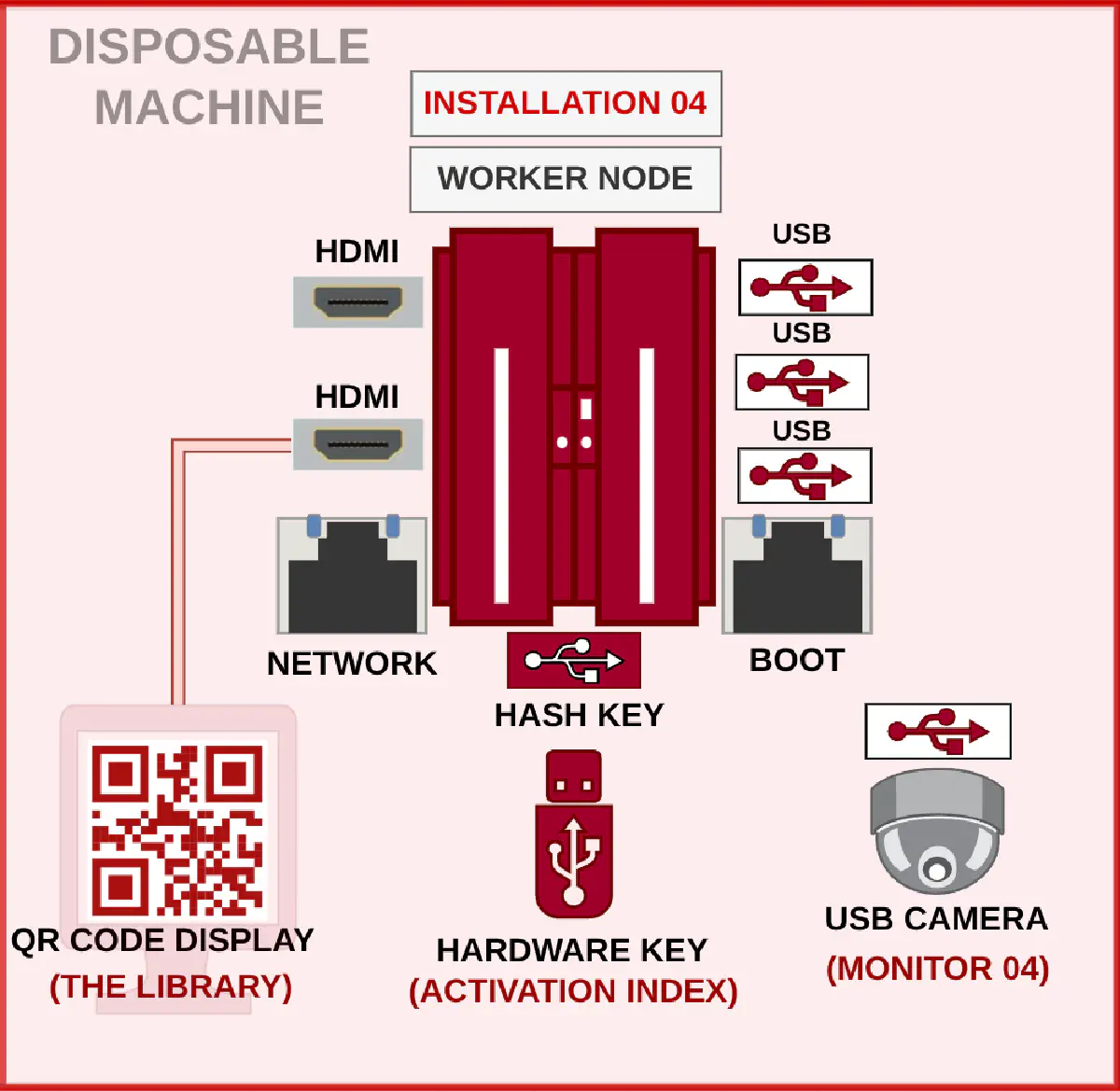
The Installations are the computers the user actually works on. They don’t necessarily need to be identical. In fact, one of the interesting properties of this architecture is that the Installations could be almost any compatible computer. The number of nodes would primarily be limited by the hardware cost and complexity the operator is willing to manage. Each Installation would have two network connections.
Boot network
One network connection connects to the Ark. This is used to boot the machine and retrieve its operating environment.
Operational network
The second network connection connects to the normal network infrastructure. This could provide access to the internet, local services, or whatever other resources the Installation is intended to use. The separation between these networks is an important part of the architecture. The system could also be configured in different ways depending on the threat model.
For example, an Installation could:
- Run entirely from RAM.
- Use persistent local storage.
- Have its network cable physically disconnected.
- Operate as a completely offline node.
- Be reimaged from the Ark whenever required.
Running entirely from RAM provides one of the strongest forms of disposability, but it isn’t mandatory for the concept. An Installation could also have its own camera and QR-code display for the clipboard and communication system described later.
The Terminal

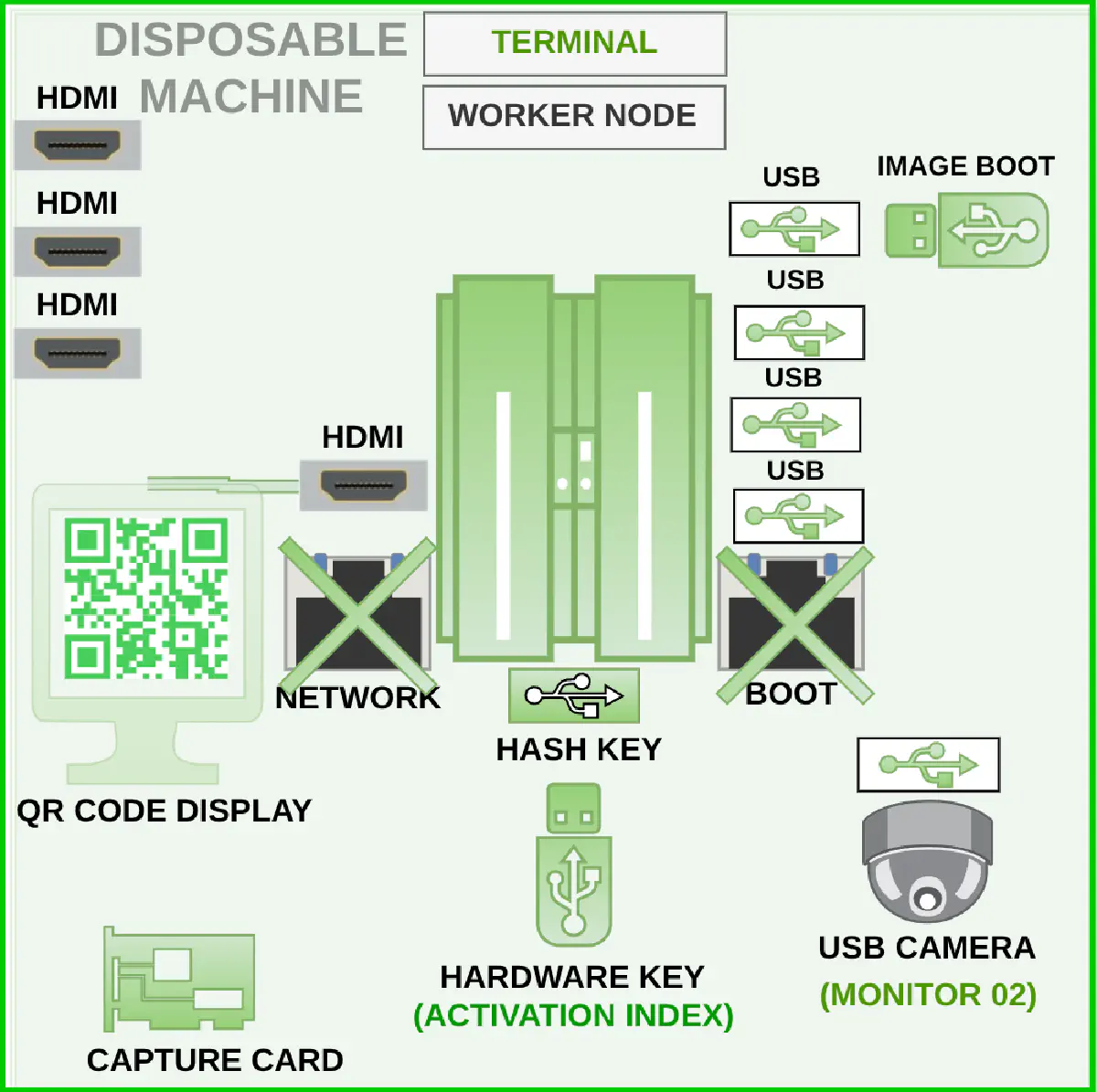
The Terminal is the user’s interface to the entire system. It is intentionally isolated from both the boot network and the internet.
The Terminal’s job is relatively simple:
Handle the user’s keyboard and mouse.
Switch peripherals between Installations.
Receive video from the Installations.
Display those video feeds to the user.
Provide the interface used to manage the system.
This makes the Terminal essentially a display and control server, rather than a general-purpose computer. A capture card could be used to receive the video output from each Installation. A small window manager could then present those feeds as individual windows on the Terminal. The Terminal could also handle keyboard and mouse switching, either through dedicated hardware or a controlled KVM system.
Because the Terminal has such a limited purpose, it could potentially be built from relatively inexpensive, low-power hardware. It could even boot from a USB drive and remain largely unchanged once the system had been established. The idea is to make the Terminal one of the least interesting computers in the architecture. It doesn’t need access to the internet. It doesn’t need access to the boot network. It doesn’t need to store large amounts of data.Its primary job is simply to provide the user with a view into the isolated machines.
The Clipboard
The clipboard is probably the part of the Halo Array that I spent the most time thinking about. One of the biggest usability problems with heavily isolated systems is moving information between environments. You can create extremely strong isolation, but if moving a URL, piece of text, or small piece of data between machines requires manually typing everything, users are eventually going to find ways around the security model. The solution I started thinking about was an information diode for the clipboard. The goal is to allow information to move between systems, but only through a deliberately narrow, controlled, and visible communication channel.
Optical communication
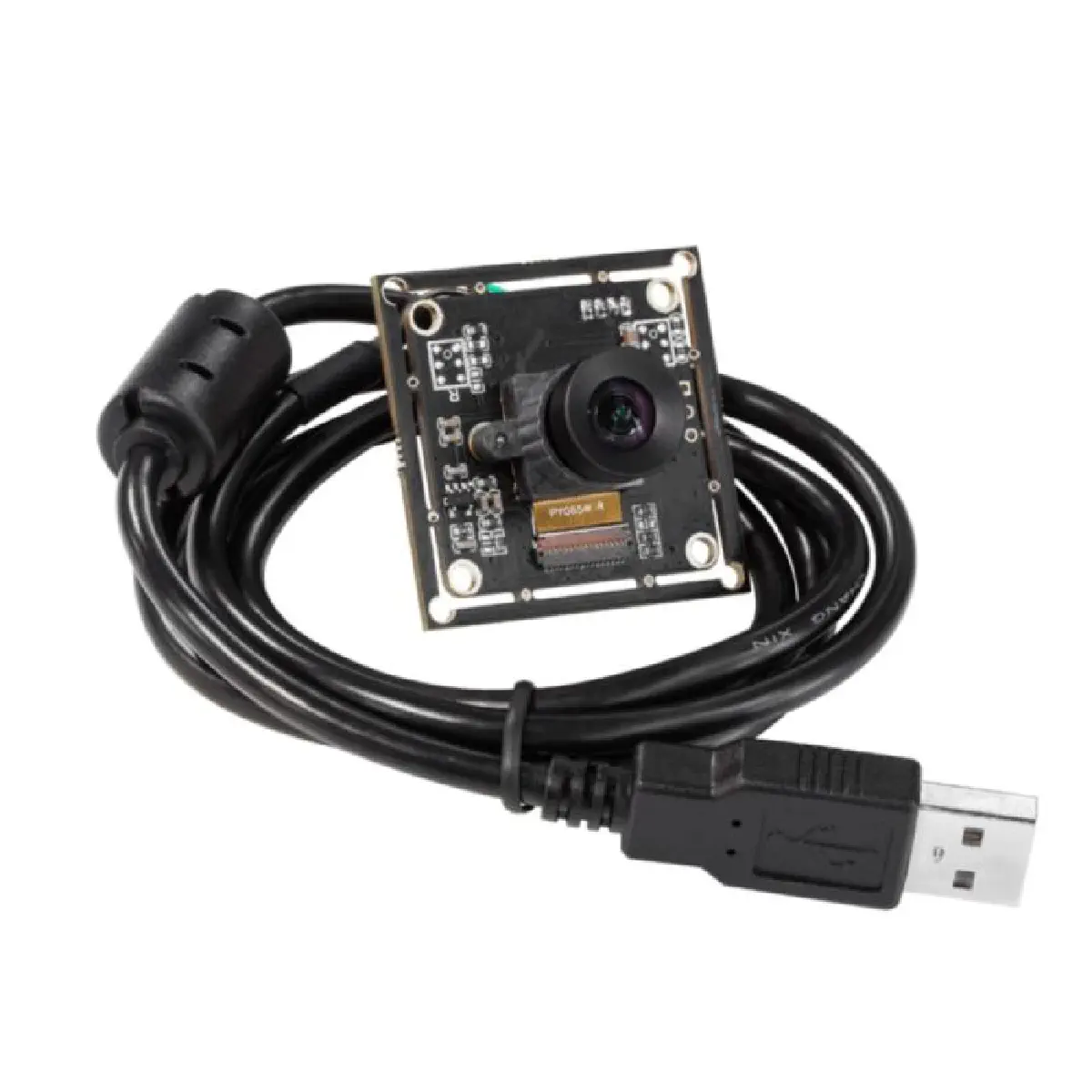
The basic idea is surprisingly simple. Each computer has a small display, potentially a five-inch display that acts as the transmitter. A USB camera is positioned in front of the display and acts as the receiver. The display shows a QR code. The camera reads it. This creates an optical communication channel between the two computers. Normally, I would be hesitant to introduce USB into a security-critical communication path. However, with a custom physical switching system, USB becomes much more interesting. The USB connections could be kept to something like USB 2.0, deliberately limiting the bandwidth of the channel. The camera connections could then be routed through a physical rotary switching system. For example, the user’s control panel could contain two rotary switches:
- One switch selects the camera.
- The other selects which endpoint the camera is connected to.
This gives the user physical control over which systems are capable of communicating. The important property is that the communication path isn’t simply a software setting. The physical connection itself has to be established.
Controlling the Keyboard and Mouse
There are a couple of ways this could be implemented. One approach would be to use additional physical switching hardware for the keyboard and mouse. This would give the user a set of physical controls for selecting:
- Which computer receives the keyboard.
- Which computer receives the mouse.
- Which computer is connected to the clipboard camera.
That would require several physical switches, however. A second option would be to use a KVM system that can be controlled by the Terminal. The Terminal could detect which Installation the user has selected and then send a command to the KVM to change the active keyboard and mouse connection. The important requirement here would be that the KVM doesn’t create an unrestricted bidirectional software communication path between the machines.
A “Globe Clipboard”
This is where I started borrowing some ideas from systems such as Qubes OS, particularly the idea of deliberately controlling how information moves between isolated environments. Instead of having a traditional shared clipboard, the Halo Array would have what I think of as a “globe clipboard.” The user could copy something normally inside an Installation.
For example:
Ctrl + Shift + C
Could copy the selected information into the Halo Array’s QR software. The QR system would then encode the information into a reference. The user switches to the destination Installation, establishes the physical communication path, and scans the QR code. The destination computer then resolves that reference and retrieves the clipboard contents.This is where the idea becomes more interesting.
The Deterministic Library
A QR code has relatively limited capacity, especially if we want to keep the communication channel deliberately narrow. Instead of putting the entire clipboard contents into the QR code, the system could use a deterministic library. The closest conceptual comparison I have found is the Library of Babel. The idea is that the actual clipboard contents are represented by a deterministic location in a known library.
The sender performs a lookup:
Clipboard → deterministic lookup → fixed-length reference
The reference is then converted into a QR code. The receiver performs the reverse operation:
QR code → fixed-length reference → library lookup → clipboard contents
The important part is that the QR code itself doesn’t contain arbitrary amounts of clipboard data. Instead, it contains a fixed-length reference. This means the receiver can enforce a very strict protocol. If the QR code doesn’t contain a valid reference of the expected length and format, it is ignored. There is a lot more that could be explored here about how the deterministic library would actually work, but that’s probably a subject for another article.
What Does Copy and Paste Look Like?
From the user’s perspective, the process could eventually feel surprisingly normal.
On the source computer:
Ctrl + Shift + C
The clipboard contents are converted into a reference and displayed as a QR code. The user switches to the destination computer. The physical communication path is established.
On the destination computer:
Ctrl + Shift + V
The camera scans the QR code. The destination computer resolves the reference and makes the resulting information available to the normal clipboard. The user can then paste it normally. The important difference is what happens underneath. There isn’t an always-on software clipboard shared between the machines. There isn’t a hidden network connection. There isn’t a background service silently transferring data. The communication path is deliberately established by the user. And, importantly, the user can see the machine that is requesting the communication.
Visible Communication
This produces an interesting side effect. If one Installation wants to communicate with another, something physically visible has to happen. A display has to show the QR code. A camera has to be pointed at it. The corresponding hardware has to be connected. The user has to select the relevant endpoints. This creates several layers between software and communication. A malicious program cannot simply decide:
“I’m going to send this data to another machine.”
It has to interact with a system that was intentionally designed to make that communication visible and constrained. That doesn’t make covert communication impossible. It does, however, make the communication mechanism considerably more constrained than an ordinary shared network or software clipboard.
The Main Ideas Behind the Halo Array
- RAM-only operating environments - machines can be provisioned and discarded without relying on persistent local state.
- Two-NIC separation - a boot/provisioning network is distinct from the machine’s operational network.
- Physically controlled peripheral routing - the rotary switching creates a hardware-controlled communication path.
- Optical communication - QR codes provide a deliberately narrow communication channel.
- Human authorization - software can request an operation, but the user must physically establish the path.
- Fixed-length references - the QR doesn’t carry arbitrary clipboard data.
- Deterministic/seeded libraries - the reference can resolve to locally generated/known data rather than transmitting the data itself.
- Visible requests - the machine has to visibly present what it wants to communicate.
- No persistent inter-machine clipboard - there isn’t an always-on software mechanism silently moving data around.
- Unified display controller - with the use of a capture card the video streams of the machine can be feed into the terminal and a small window system to manage and control placement and use.
- Isolated control of boot server - the terminal is used to boot the nodes (Installations) but sending a command by the optical diode display system. Creating a one way boot command.
- No x86 Virtualization - virtualization adds a lot of complexity to a system, and a lot of code to understand to make it secure, so removal of this helps maintain a simpler understandable system.
- Better Isolation of network cards using two-NIC and different disposable machines creates a gap in the different systems.
The Downsides
Of course, all of this comes at a cost.
Hardware Cost
The biggest disadvantage is probably the amount of hardware required. Instead of having one powerful computer running several virtual machines, the Halo Array potentially requires:
- A Terminal
- An Ark
- Multiple Installations
- Network hardware
- Capture hardware
- Cameras
- Displays
- KVM or physical switching hardware
- Offline storage
The Installations themselves don’t necessarily need to be expensive. A cluster of inexpensive computers could potentially serve as the nodes. Used small-form-factor business machines could also be used. The more specialized hardware would be concentrated around the Ark and Terminal.
Lack of Portability
This isn’t a laptop architecture. The amount of hardware involved makes the Halo Array fundamentally stationary. It could potentially be built into a small rack or transportable case, but even then it would be a considerable piece of equipment. The architecture trades portability for isolation.
User Complexity
The other major problem is the user. The Halo Array requires the user to understand what the system is doing. They need to know which Installation they’re using, which network it is connected to, where information is being sent, and when a communication path is being established. This creates a usability challenge. A system that is extremely secure but so frustrating that users constantly work around it isn’t necessarily a secure system in practice. This is one of the areas where systems such as Qubes OS provide an interesting comparison. The Halo Array takes the idea of isolation further into the physical architecture, but that also means accepting considerably more hardware and operational complexity.
Where the Idea Could Go
The Halo Array is still just a concept. There are many parts of the design that would need considerably more engineering before it could become a practical security architecture. The physical switching system would need to be designed and tested. The QR communication protocol would need to be carefully specified. The deterministic library would need to be implemented. The Ark would need a secure provisioning process. The Terminal would need to be treated as part of the trusted computing base. And, perhaps most importantly, the entire system would need to be threat-modelled.
There are also questions around side channels, compromised firmware, malicious peripherals, compromised hardware, optical covert channels, supply-chain attacks, and attacks against the components that are supposed to provide isolation. Those are problems I haven’t solved with this concept. The interesting part, at least to me, is not whether the Halo Array can create perfect security. It can’t. The interesting question is whether security can be made into a physical property of a computer system rather than something that exists almost entirely inside its software.
That is the idea behind the Halo Array.